TCP/IP Remote Administration Tool
Client-server remote administration tool built from raw TCP sockets — system info, screen capture and live mouse control over a custom protocol.
Role: Team project
Team
Team
Timeline
Nov 2025
Type
Academic
01 · Context & Problem
What problem this solves
The IF4001 Operating Systems course required building a remote-administration tool from raw TCP sockets, without relying on an existing remote-desktop library or protocol.
02 · Solution
What it actually does
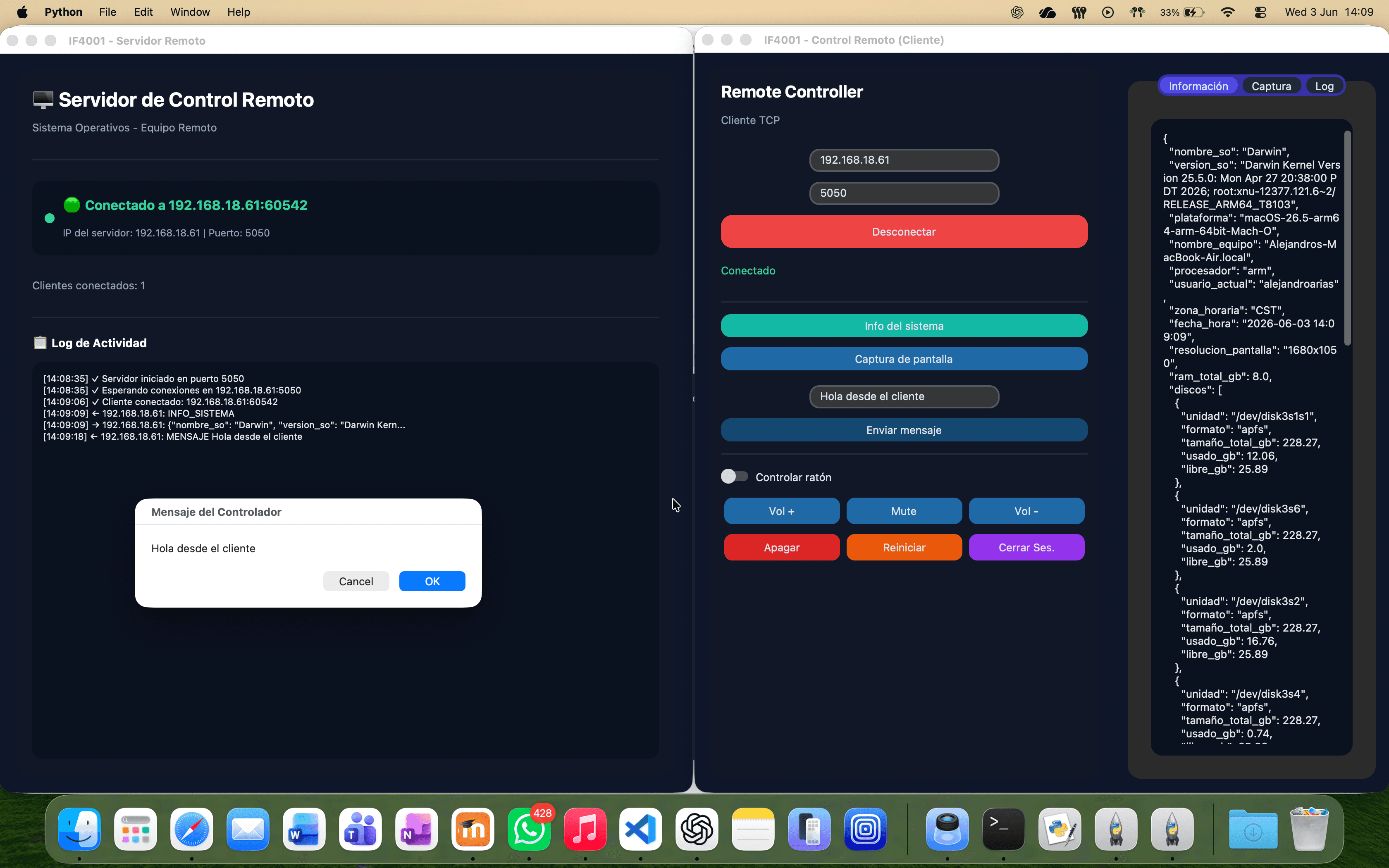
Two Python applications talking over a custom line-based TCP protocol: a server that runs on the remote machine, and a client with a customtkinter GUI for the controlling machine.
- System info reporting: RAM, disk list with free/used space, screen resolution, current user, timezone, date/time and active processes.
- Screenshot capture and transfer over the same socket, using a length-prefixed binary frame so image data can't be confused with text commands.
- Live mouse control: move, left-click, right-click and double-click, sent from the client's GUI to the remote machine in real time.
- Remote power actions: shut down, restart, log off, plus volume up/down/mute.
- A multithreaded server so handling one client's commands never blocks the GUI or other connections.
03 · Architecture
Architecture & decisions
A line-terminated text protocol for commands (INFO_SISTEMA, MOUSE_MOVE x y, APAGAR, and similar), with a distinct binary framing (IMG <byte-count>\n<payload>) for screenshot transfers on the same connection.
Mixed text-and-binary protocol on a single TCP stream, length-prefixed for binary frames.
Keeps the protocol simple for text commands while still allowing large binary payloads (screenshots) without ambiguity about where a message ends.
04 · Stack
Full stack, by layer
Frontend
Backend
External Services
05 · Challenges
Technical challenges solved
Mixing text commands and binary image data on one stream
Problem: Sending both plain-text commands and raw PNG bytes over the same socket risks one corrupting the parsing of the other.
Solution: Text commands are newline-terminated; image responses are framed with an explicit byte count read before the payload, so the receiver always knows exactly how many bytes to read regardless of content.
Cross-platform volume control
Problem: Windows and macOS have no common API for controlling system volume.
Solution: Used pycaw on Windows and an AppleScript-based fallback on macOS, isolated behind one function.
06 · Results
Results
Fully working remote administration tool meeting the course's requirements, tested across Windows and macOS.
No hard metrics confirmed yet for this project — the impact above is qualitative only.
07 · Retrospective
What I'd do differently
First hands-on look at how much protocol design matters once text and binary data share the same TCP stream — small framing mistakes silently corrupt the next message instead of failing loudly.
Have a system that needs building?
Tell me what you're running today and what's breaking. I'll tell you honestly whether I can help.